What it looks like
Build a configuration on the left, edit parameters on the right, then test it against sample items with a full report at the bottom.
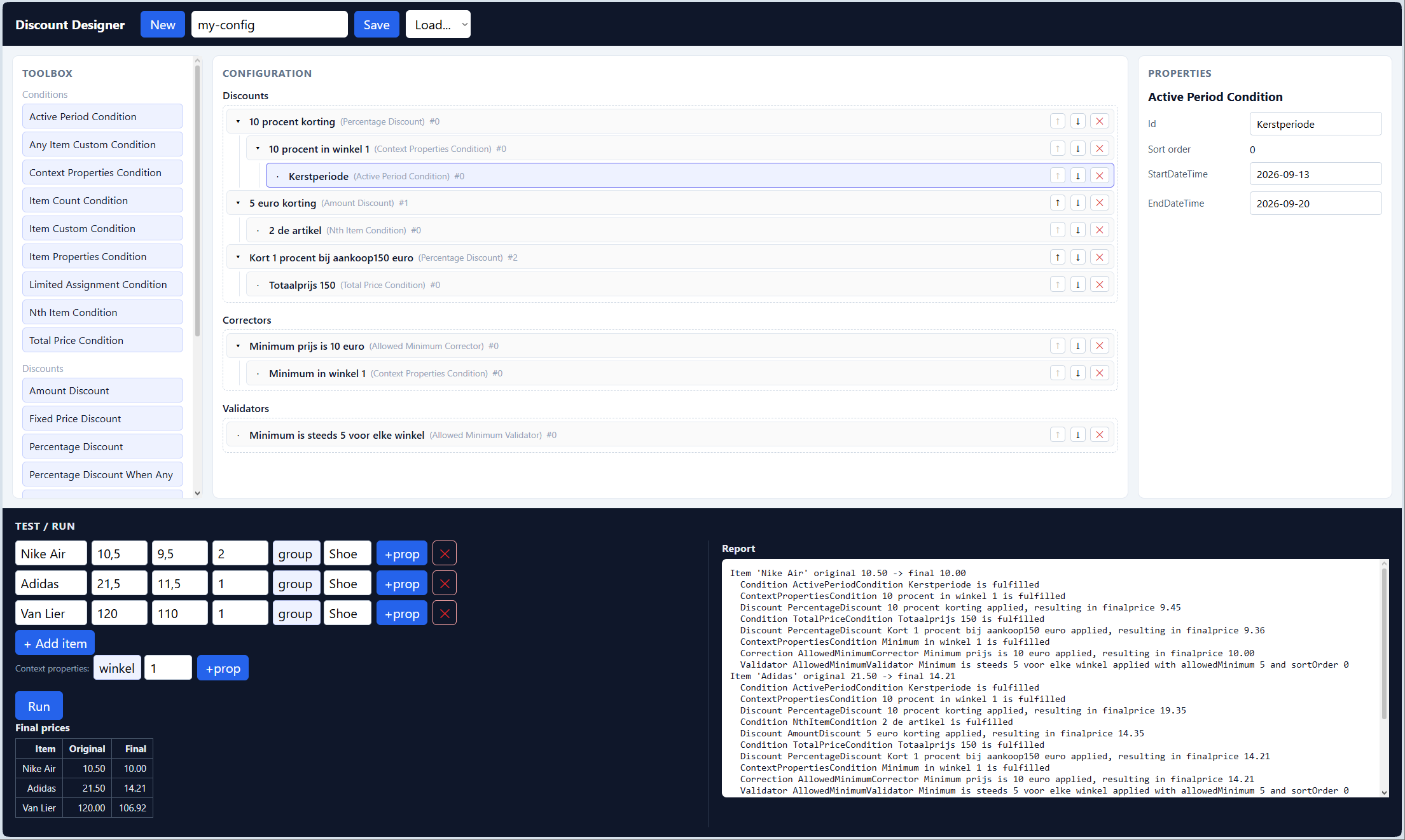
DiscountEngine designer — toolbox, configuration tree, properties and the test/run panel.
What it does
For every item, the engine runs an ordered pipeline of discounts, then correctors, then validators — each one applied only when its conditions are met.
  item -> [DISCOUNTS] -> [CORRECTORS] -> [VALIDATORS] -> final price

  every stage is sorted by sort order and gated by its CONDITIONS
  conditions: item/context properties, active period, item count,
              nth item, total price, custom expressions, ...
| Stage | What it does |
|---|---|
Discounts | Lower the price — amount, percentage, fixed price, price-2/price-3, "when any condition" — cumulating or best-wins. |
Correctors | Clamp the result — never below purchase price, never above the original price, or a hard allowed minimum. |
Validators | Guard rails that throw when a rule (e.g. a minimum allowed price) is broken. |
Conditions | Gate each stage — reusable and nestable, from simple property matching to custom expressions. |
How to use it
All editor work, no code needed.
Build
Drag nodes from the toolbox into the tree.
Save and load
Save the setup as JSON and load it later.
Test
Add items, run, and see the final prices.
Follow the report
Read the report to see what was applied.
The idea
How the engine is meant to be used.
Build one or several set-ups, depending on the needs, and store each under a name or key. An app that needs discounts loads the right set-up, feeds in the items and their context, and calculates the result.
The engine is built generic: both items and the context can carry their own properties. That makes it easy to group items and set up exceptional discounts for a group, for specific shops, or for certain periods. Per discount you also decide if it is cumulating or not.
The engine makes a text report by default, so you can see which rules were applied per item. You can also add other output styles, like tickets for printers.
Keep history and versions, so a set-up can be changed when a discount changes. Because periods are optional conditions, there can be a smooth hand-over between discounts.
The tree is built from conditions. Conditions can sit side by side, or a condition can hold conditions of its own.
Feel free to add new objects to the toolbox.
Key features
A small engine with a modern editor on top.
Drag and drop designer
Build the configuration in a tree view with drag and drop.
Reusable conditions
Items, context, periods, counts, the nth item, totals and more.
Custom queries
Free-form expressions for advanced rules.
Save and load
The configuration is plain JSON, easy to store and re-use.
Text report
Every step is explained, so pricing stays transparent.
Unit tested
64 tests cover the engine, conditions, correctors and reports.
About this project
Why it came to be.
I built DiscountEngine in my spare time while working at Torfs. I was never able to really introduce it there, but I am proud of what it became. I hope it was not a waste - and that someone finds it useful.
Download the source
The full DiscountEngine solution - engine, API, React designer, tests and documentation - in one archive.
Download DiscountEngine.zip